Context Engineering with Threadlinking: Like Git for Decision History
Feb 2026
Dear Friends,
If we're twitter mutuals, you might have seen me post about a context engineering tool I recently built for Claude Code called Threadlinking. A few people have asked for a writeup, so here it is.
The idea predates Claude Code. In spring 2025, I was generating files through ChatGPT conversations that would end up in my Downloads folder with no record of why they existed. So I built my prototype: a CLI tool with a browser extension that captured conversation URLs and linked them to files under a named "thread," which is a project-level tag connecting files to their context.
Months later, once I had begun using Claude Code daily, I realized there was a simpler implementation if I made Threadlinking "Claude Code native." I was having the same problem that gave me the idea for Threadlinking in the first place. I'd build something useful in a session, lose all the context when the conversation ended, and then have to re-explain everything to Claude next time. Much of the time I'd forgotten the details myself.
So I updated Threadlinking to be a tool for Claude as much as a tool for me.
Threadlinking is an open-source context preservation tool, designed specifically for Claude Code context engineering. It saves the reasoning, snippets, and summaries from your conversations alongside the files they produced, so when you come back later you've got the condensed information you need.
Code History vs. Decision History
We already have tools for tracking what changed in our code. Git gives you a record of every line added, removed, modified, and when. Which is great, but the limitation is that git doesn't tell you the "why" behind your changes. The commit message might say "switch to PostgreSQL," but it won't tell you that you considered MongoDB first, rejected it because your payment system needs ACID transactions, and almost went with SQLite before realizing that you'd need concurrent writes.
That reasoning context requires a different kind of artifact than the code itself. I've been calling this your decision history. The more I worked with Claude Code, the more I noticed that my decision history was invisible in most of my projects. Not just for Claude's memory, but mine, too.
This isn't an idiosyncratic problem. Anyone building with AI coding agents or other assistants across multiple sessions runs into it. Some common workarounds are CLAUDE.md files, manual notes, or pasting summaries into the start of each new conversation. These help, but you have to maintain them by hand, and they don't capture the context as it's being generated.
My primary insight that defines Threadlinking is that context preservation should be at the idea or project level, not the conversation. A project lives across many sessions, often across many months. What I actually wanted to preserve wasn't information about "what happened in this chat," but "what has been going on with this project."
Threads, Snippets, and File Links
The core concepts in Threadlinking:
A thread is a named container for the context. You create one thread per project or idea (not per task or session). I have threads called personal-website, threadlinking, byemarianne. These accumulate context over time as I keep working on the projects across many sessions.
A snippet is a short piece of context from the conversation that gets saved to a thread. It's usually a sentence or two explaining a decision, a trade-off, or some reasoning that would otherwise disappear with the conversation. Example: "Chose Eleventy over Next.js because the goal was zero client-side JavaScript."
File links (threadlinking) connect specific files to threads. When you link a file, you're creating a durable connection between "this code exists" and "here's why." Later, when you or Claude run threadlinking explain path/to/file, you get back every snippet from every thread that file belongs to.
Naming conventions matter. Good thread names are project-level: personal-website, auth-system, client-acme. Bad thread names are at the task level: fix-bug-123, refactor-tuesday. Threads are meant to be these long-lived containers that grow over time.
How It Actually Works
Threadlinking plugs into Claude Code through two components. I'll explain each briefly, and if you're not already familiar with MCP, I'll give you the short version: MCP (Model Context Protocol) is the open standard that lets AI assistants use external tools. Anthropic created it, and in December 2025 they donated it to the Linux Foundation, where it's now co-governed by OpenAI, Google, Microsoft, and others. This is how Claude Code talks to the outside world.
The MCP Server
The MCP server gives Claude direct access to the whole threadlinking system. Claude can create threads, add snippets, link files, search across your context, and explain the history behind a file, all without you having to type any of the CLI commands.
This is why it's a tool for Claude as much as for me. I wanted to design a fairly frictionless system. Claude can proactively save context when it notices significant decisions being made. When you start a new session, ask Claude to run threadlinking list and it will check for relevant threads and gets oriented on its own. You can engineer your Claude to do this automatically, either silently or explicitly. This changes the experience of returning to a project quite a bit, and in the few weeks I've been using this I've noticed that Claude seems much better oriented to my projects more quickly.
The CLAUDE.md Instructions
The third piece is a set of instructions about Threadlinking that get appended to your CLAUDE.md file during setup. These teach Claude what's worth saving to threads and what isn't. Architectural decisions and trade-off reasoning: yes. Typo fixes and dependency updates: no. If everything got saved, the context would become noise, so we want Claude to be selective. The instructions are for encoding judgment about what makes context meaningful.
Local-First, No Cloud
All of this lives in a single JSON file at ~/.threadlinking/thread_index.json. Your context stays on your machine.
I do want to be transparent about privacy, though. If you're using Threadlinking through the MCP server, that means Claude reads your context in order to work with it, so it passes through Anthropic's infrastructure like anything else in your conversation. Threadlinking doesn't add any new data exposure beyond what you're already sharing by using Claude Code in the first place, but it doesn't eliminate it, either.
For people who are more privacy-conscious and want this as a dev tool for decision history, Threadlinking also works as a standalone CLI tool. You can use it entirely by hand, without the MCP server, as a kind of "git for decisions." You manually save your snippets, link your files to threads, and search your context yourself. Nothing will touch an LLM unless you set up the MCP integration.
Under the hood, the file operations use atomic writes and locking to prevent corruption when the CLI and MCP server are both trying to read and write at the same time. If the JSON file somehow gets corrupted, the storage layer backs it up automatically and falls back to a clean state.
Semantic Search
Beyond basic keyword matching, Threadlinking also supports semantic search. This is one of the more useful features for cross-project discovery.
The semantic search runs a local embedding model (all-MiniLM-L6-v2) that converts your snippets into 384-dimensional vectors and stores them in a local vector database called Vectra. This enables you to search for project context by meaning rather than exact words. If you searched "why did we choose this database," the semantic search feature will return your snippet about why you "went with PostgreSQL over MongoDB for relational integrity."
The embedding model downloads once (about 30MB, cached locally) and runs entirely on your machine after that. There are no API calls, no tokens consumed, no data sent anywhere. To set it up, you have to run threadlinking reindex, which builds the vector index from your snippets. Run that any time your want to reindex your threadlinking context.
What It Looks Like
To show you what Threadlinking actually feels like, here's what happens in my own workflow:
When I start a session, I'll ask Claude to run threadlinking list to see where things stand. Here's what mine looks like, with 18 threads across my projects:
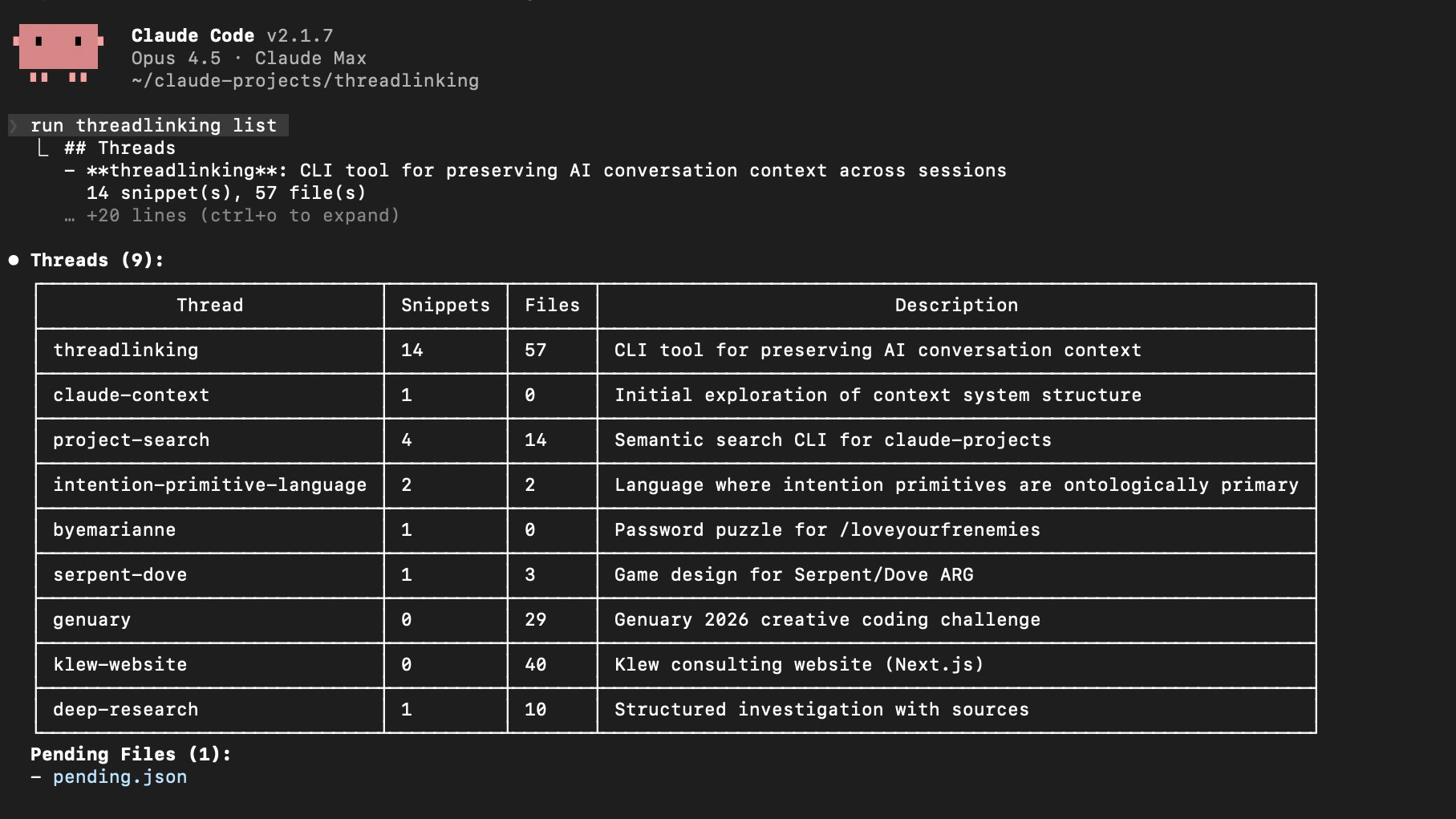
Each row is a thread, or a project I've been working on. Below the thread table, there's a list of the pending files that were edited in recent sessions but haven't been linked to a thread yet. From here Claude might ask if I want to attach them, or I'll tell it to.
During a session, when Claude and I are making decisions, Claude saves the reasoning as snippets. For this website, for example, one of the snippets reads:
threadlinking snippet personal-website "Chose Eleventy over Next.js.
The goal is a minimalist site with no client-side JavaScript. Eleventy
generates static HTML, which aligns with the performance and simplicity
requirements."
I didn't type that. Claude did it on its own because the CLAUDE.md instructions taught it to recognize that kind of decision as worth saving.
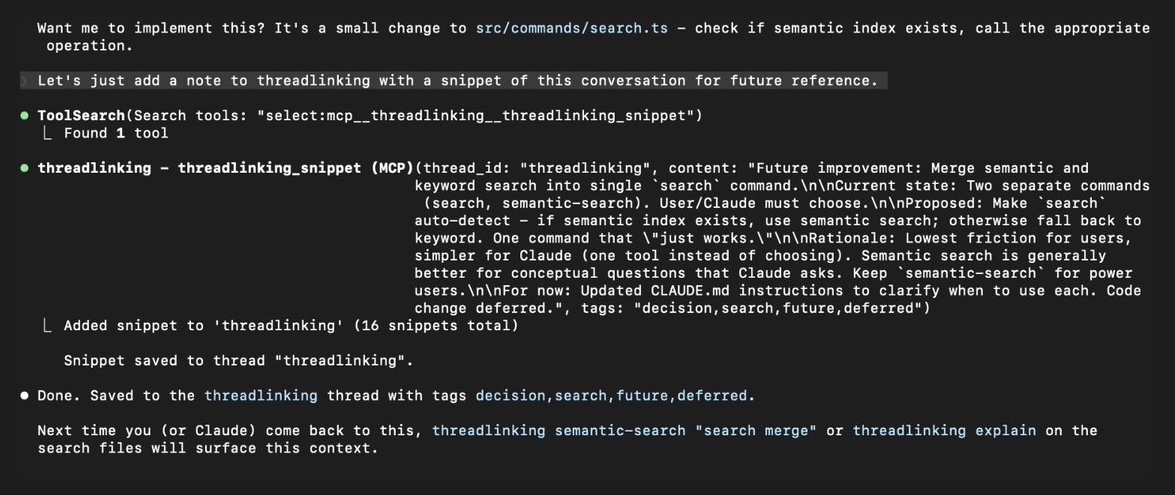
Here's an example from a different session, where Claude saved a snippet about merging the search commands in Threadlinking's own codebase:
When I come back to a project weeks later and wonder why I made a particular choice, I (or Claude) can run:
threadlinking explain .eleventy.js
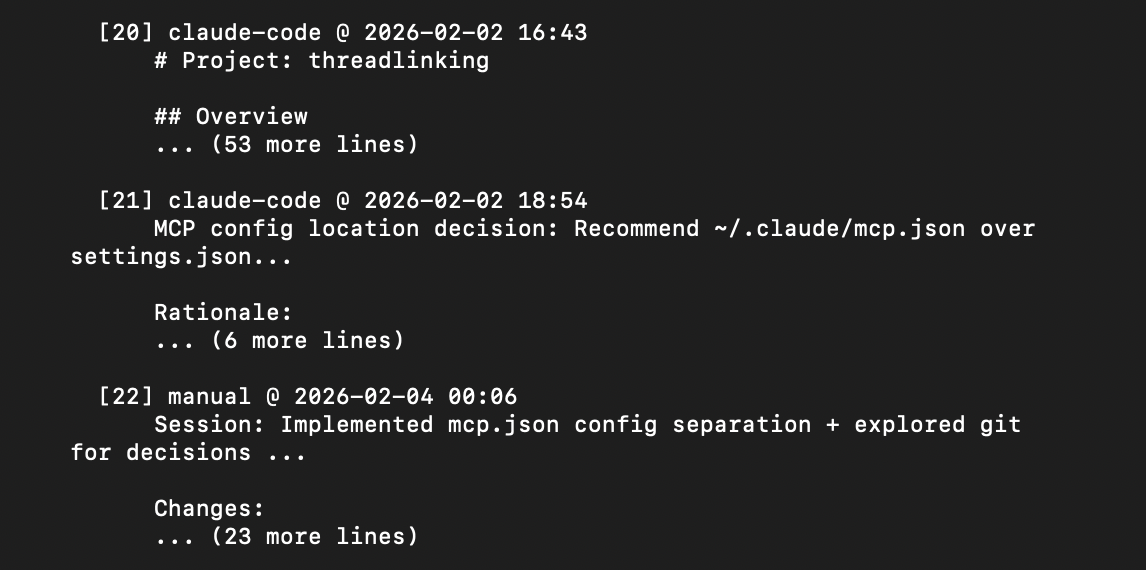
And I get back the full context. When the decision was made, what the reasoning was. Here's the tail end of what explain returns for Threadlinking's own MCP server file, showing recent architecture decisions:
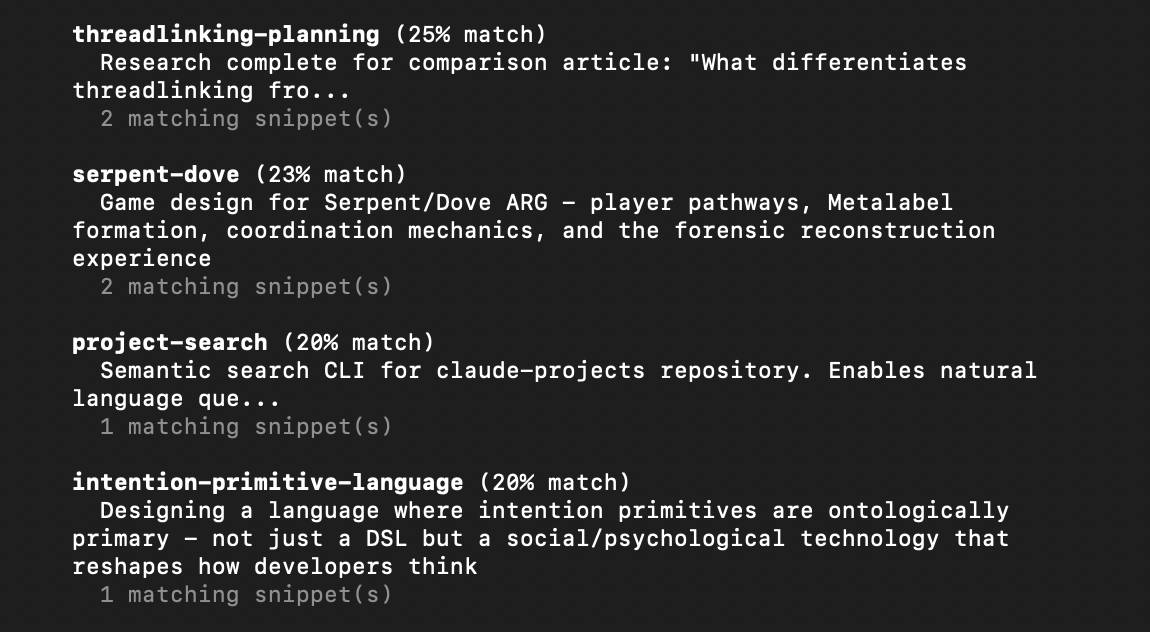
If I can't remember which of my projects had a conversation about, say, cryptographic key generation, I can use semantic search:
threadlinking semantic-search "cryptographic key generation"
This searches across all my threads by meaning, and returns the relevant ones ranked by similarity, surfacing connections across projects you might not have thought to look for:
The Bigger Picture
I'm an ARG designer and the founder of Klew Studio, where I work on narrative intelligence and design. I came to software engineering through coding using AI. Andrej Karpathy called this phenomenon "vibe coding" last year, and he recently proposed a follow-up term, "agentic engineering," for the more rigorous version of the practice. This version of LLM-powered coding and AI Engineering is what I'm learning during my time at the Fractal Tech Bootcamp.
I don't have a traditional engineering background; I'm a designer and strategist who started building software because AI tools made it possible for me to do so. Context preservation matters to me because I'm a "natural language native" programmer. When I'm working with Claude on a codebase, I need the reasoning to persist between sessions, because I can't always reconstruct it from the code alone. I think this problem exists regardless of skill level, though. Even experienced engineers can lose track of the "why" when the conversations that produced the "what" disappear.
There's a connection here to how I think about narrative design. In ARGs, one of the necessary skills is maintaining story continuity across many touchpoints, participants, and timeframes. The game's story has to cohere across a large ecosystem. Threadlinking is just that problem applied to code and project repositories. It's an answer to "how do you maintain the coherence of a project's story across sessions, contributors, and time?"
So where git is the record of what happened, Threadlinking is the record of why. That's why I've been calling it "like git for decisions."
Getting Started
Threadlinking is open source on GitHub and published on npm. Install it globally and run the setup:
npm install -g threadlinking
threadlinking init
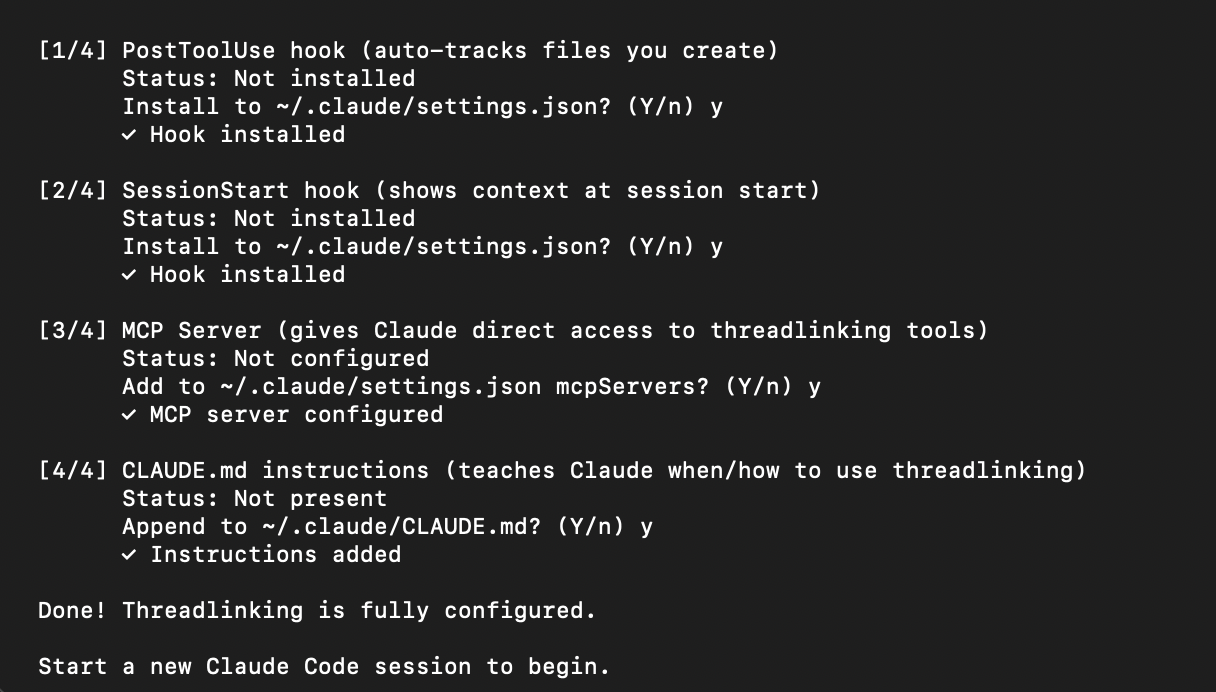
The global install is needed so that threadlinking is available as a command across sessions. The init command walks you through the full configuration: MCP server and CLAUDE.md instructions. The whole process takes about a minute.
I'm currently working on getting it listed in the MCP server directories (Smithery, Glama, mcp.so) and exploring IDE extensions for VS Code. I also have an Obsidian plugin and browser extension in the works. I'm bundling it as a Claude Code plugin this week, for those who want everything all in one easy setup. The roadmap is public if you're interested in where it's headed or want to contribute.
I'd love to hear how this compares to your personal context engineering setups. Have you built systems for preserving context between sessions? Have you had the problem I'm solving with this tool? Let me know via comments or DM me on X.
So Long,
Marianne 🩵